
Running Kiln Locally
Kiln must be run locally for development. This will ensure that Kiln and Vue Development Tools run in development mode.
Steps to run it locally
- Clone the Clay Kiln GitHub Repository
- cd into newly cloned clay-kiln directory and run the command
npm link
Clay Kiln Development
The next 2 steps are only necessary if you are actively developing Clay-Kiln, not if you just want a local version linked so you can use the Vue dev tools in your browser.
- While still in the clay-kiln directory, run
npm install - Start a watch on Kiln that will recompile as you make any changes to the code by running
npm run watch
- cd into the directory of the site running clay locally.
- Make sure you are in the directory that contains the node_modules directory for the site.
- Also make sure the site is running
- In this directory, run
npm link clay-kiln - Do a soft restart of your running site by typing
rs+ENTERinside the terminal where the site is running. ⚠️ Note that if youctrl-cto stop your clay site completely and then start it again, you will no longer be linked to your local version of kiln. ⚠️ Whenever you do that you will need to run thenpm link clay-kilncommand again, and do a soft restart of your site instance. - If you are ever unsure if you are locally linked to clay-kiln (or any other package) you can enter the command
ls -l node_modules | grep ^land it will list all locally linked packages. If you don't see clay-kiln listed, rerun the above 3 steps. - A running site will sometimes cache its packages, so you may not see the local version of kiln being run in your browser right away. You can try making a change to your site's code so that it recompiles, or try deleting the browserify-cache.json file and recompiling. That will usually do the trick.
Vue Dev Tools
One of the advantages of running Clay-Kiln locally is that you can use the Vue Dev Tools in your browser. This can be very helpful in understanding Clay-Kiln, particularly in how the data in the Vuex State Object is structured. The Dev Tools are available for Chrome as well as FireFox.
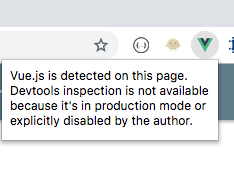
The browser plugin will add an icon to your browser that is turned on when you are on a page that uses Vue. However, when the Vue it detects is in Production Mode, you will be unable to use the Plugin. You will instead see this message.
When Vue is in Development Mode (as it will be when linking to Clay-Kiln locally, and is one of the best ways to tell if your site's local link is working properly), you will see an extra tab called Vue in your browser's development tools. If you go to that tab you should see something similar to this.
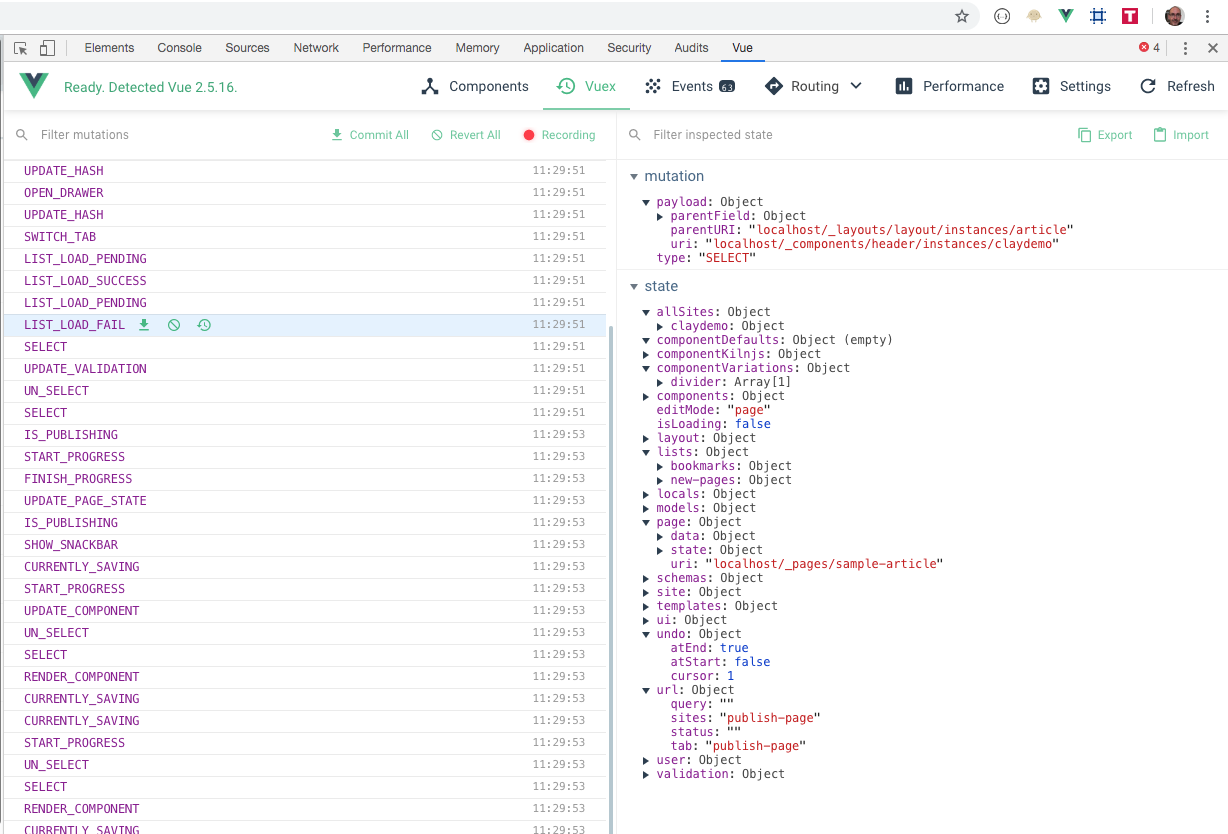
The most useful section in the Vue development tools is found on the Vuex tab. On the left, you will see all of the actions triggered by the Clay-Kiln app. You can see when a component is saved, rendered, published, etc. and by clicking on the Action in the left column you can inspect the payload of that action at the top of the column on the right. Also on the right, you will see the state object, which contains all of the data within the Clay-Kiln app. By exploring the actions and the state, you will get a good idea of how the app is constructed.
Anyone building a Plugin or using kiln.js should find the information revealed on the Vuex tab to be very helpful as it will guide you on what actions you can take or subscribe to.